Exploria: A Bold Font for Digital Campaigns
It’s 8:45 AM, and I’m staring at a blank canvas in Canva. The client wants a launch graphic for a new outdoor gear brand, and the deadline is tight. The visual is almost there—nature shots, earthy tones, a clean layout—but something feels off. The text isn’t popping. That’s when I remember Exploria. A font that blends rustic warmth with jungle energy. It’s not just a typeface; it’s a mood.
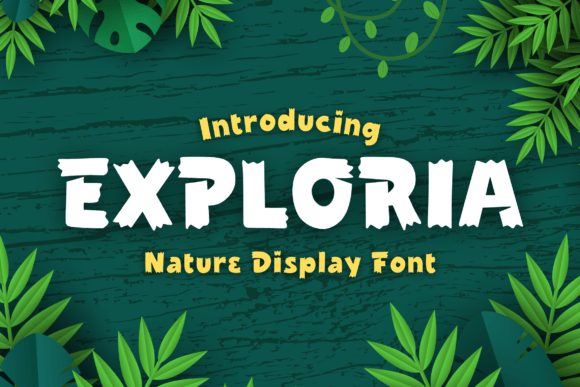
Exploria is a display font that captures the essence of natural textures and organic shapes. Its lines feel handcrafted, as if carved from wood or etched by wind. The font has a raw, unpolished edge that still feels refined. It’s perfect for brands that want to evoke a connection to nature, authenticity, and adventure. For marketers, this means a font that stands out without being overwhelming.
When designing social media posts, Exploria adds immediate visual interest. It works best on headlines, callouts, and logo-style text. In a feed full of sleek, modern fonts, Exploria cuts through with its unique character. It’s ideal for Instagram posts, Pinterest pins, and YouTube thumbnails where first impressions matter.
One of the biggest challenges in digital marketing is making text readable on small screens. Exploria handles this well, especially when used in short bursts. On mobile previews, the font remains legible, even at smaller sizes. But it’s important to pair it with a clean sans serif for body text. A combination like Exploria with Montserrat or Lato keeps the design balanced while maintaining visual impact.
For a recent campaign promoting a seasonal sale, I used Exploria as the main headline. The font gave the message a sense of urgency and authenticity. “Summer Adventures Start Here” in Exploria felt more personal than a standard bold sans serif. It made the copy feel like a handwritten note from a friend, which is exactly what the brand wanted.
Exploria also shines in promotional content sets. Whether it’s an email banner, landing page header, or webinar promotion, the font adds a layer of personality. It’s not just about looking good—it’s about creating a consistent brand voice. When every piece of content uses the same font, it reinforces recognition and trust.
Another use case I’ve explored is in branded templates. For a client who runs a lifestyle blog, I designed a set of social media graphics using Exploria for headlines and subheadings. The result was a cohesive look that felt both professional and approachable. The font worked equally well on dark backgrounds, light backgrounds, and image overlays, making it versatile for different platforms.
When working with Exploria, it’s important to consider the weight and style variations. Some versions have ligatures that add a subtle touch of elegance. Others offer alternate characters for a more custom feel. These details can make a big difference in how the font is perceived. A well-chosen variant can elevate a simple headline into a memorable design element.
For a campaign focused on eco-friendly products, Exploria helped reinforce the brand’s values. The font’s organic feel aligned perfectly with the messaging around sustainability and natural materials. It wasn’t just a choice of typography—it was a statement. Audiences responded positively, with higher engagement rates on posts that used the font consistently.
Exploria also pairs well with other creative fonts. A script font for a tagline, a serif for a quote, or a modern sans serif for body text can create a layered design that feels dynamic yet cohesive. The key is to let Exploria take center stage for headlines and titles, while supporting fonts handle the details.
One thing to keep in mind is commercial licensing. Exploria is available in multiple file formats, including OTF and TTF, and comes with clear terms for use in ads, merchandise, and client campaigns. Before finalizing a design, it’s always a good idea to double-check the license to avoid any legal issues down the line.
For a recent YouTube thumbnail project, I used Exploria for the title and a complementary sans serif for the description. The result was a thumbnail that stood out in a crowded feed. Viewers could quickly grasp the content’s theme, and the font added a sense of excitement and energy. It was a small change, but one that made a noticeable difference in click-through rates.
Exploria is more than just a font—it’s a tool for storytelling. It helps convey the tone and personality of a campaign in a way that’s both visually compelling and emotionally resonant. Whether it’s a product launch, a seasonal promotion, or a branded content series, the font brings a unique energy that other display fonts simply can’t match.
As a marketer, I’ve found that the right font can turn a good design into a great one. Exploria doesn’t just look good; it feels right. It’s a font that understands the power of first impressions and the importance of consistency. For anyone looking to add a touch of natural elegance to their digital campaigns, Exploria is a must-try.